---
title: "How your rate reaches the board"
space: "Setup Guide"
url: "https://jmtradelink.com/setup/supplier-portal/04-see-your-rate-on-the-board"
updated: "2026-11-12"
---
When Suresh saves his rate, Priya sees it on the **Cheapest Port Board** the next time she opens or refreshes the board. The board uses it to find the cheapest port and mill for each buyer.
At the end of this page, you know how your rate becomes the ex-mill price on the board, and where Priya sees it.
## Before you start
- Finish [Quote today's rate](/setup/supplier-portal/02-quote-todays-rate).
- The steps on the board are for Priya, the export coordinator. Mill users cannot open the board. To read the whole board, see [Read the Cheapest Port Board](/setup/cost-the-deal/01-read-the-cheapest-port-board).
## How the price is made
For each port, the board takes the mill's price at that port: the ex-mill rate plus the truck freight from the mill to the port. These are the prices in the **Your prices** table on the portal.
```mermaid
flowchart TD
A[Ex-mill rate
28,700 per MT] --> B[+ truck freight
to the port]
B --> C[Ex-mill on the board
29,900 at Visakhapatnam]
C --> D[+ bag, port charges,
sea freight]
D --> E[Total per MT]
```
In the demo, Sri Venkateswara Rice Mill quotes 28,700 per MT at the mill gate. The freight to Visakhapatnam is 1,200, so the board shows ₹ 29,900 for this mill at Visakhapatnam. The freight to Kakinada is 400, so the price at Kakinada is 29,100.
## Steps
1. Priya opens the **Export Management** workspace and clicks **Daily Price**. The **Cheapest Port Board** opens.
2. She sets **Item** to **IR-64-Parboiled-10%** and **Deliver to (blank = FOB)** to **Cotonou**.
3. She clicks the port **Visakhapatnam** in the **Ports** tab.
4. Under the map, the **Mills for Visakhapatnam** table shows each mill that quoted for this port. The **Ex-mill** column shows the mill's price at the port.
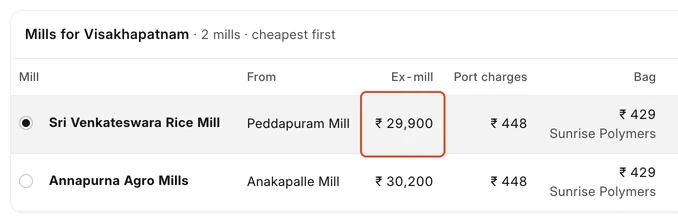
In the demo, the row of Sri Venkateswara Rice Mill shows:
| Column | Demo value | What it means |
|---|---|---|
| **Ex-mill** | ₹ 29,900 | The rate of 28,700 plus the freight of 1,200 to Visakhapatnam. |
| **Quote** | quoted today | The mill sent this rate today. |
| **Rate sheet** | SIR-2026-00001 | The record of the rate that the mill saved on the portal. |
5. To price every port with this mill only, Priya selects **Sri Venkateswara Rice Mill** in the **Mill** filter.
## Check it worked
The **Ex-mill** price of the mill on the board is the same as the port price in **Your prices** on the portal. In the demo, it is ₹ 29,900 at Visakhapatnam.
## Good to know
- The board uses the newest rate of each mill. A lower rate can make your mill the cheapest for a port, and the board then shows your mill first.
- A rate from an earlier day shows the day of the quote in the **Quote** column, in place of **quoted today**.
- Each saved rate is a **Supplier Item Rate** record. Priya can open the list: type **Supplier Item Rate** in the search bar. The newest rate is at the top.
- A port shows for your mill only when your rate has a price for that port.
## Next
[The user guide](/setup)