
The costing: Deal and Cargo tabs
An Export Costing calculates the cost and the price of one deal. It has six tabs. A seventh tab, Destination Margin, shows when Skip Destination Costs is off. This page explains the first two: Deal (who buys and which route) and Cargo (how much rice, in which containers).
At the end of this page, you can read the buyer, the route and the quantities of a costing.
Before you start
- Finish Create a costing from the board, or open a costing that exists.
- In the demo, use the Won costing of the story (JMC-PI-2627-017), from Visakhapatnam to Cotonou.
Steps
-
On the Export Management workspace, click Export Costing. The list of costings opens.
-
Click the Won costing from Visakhapatnam. The costing opens on the Deal tab.
-
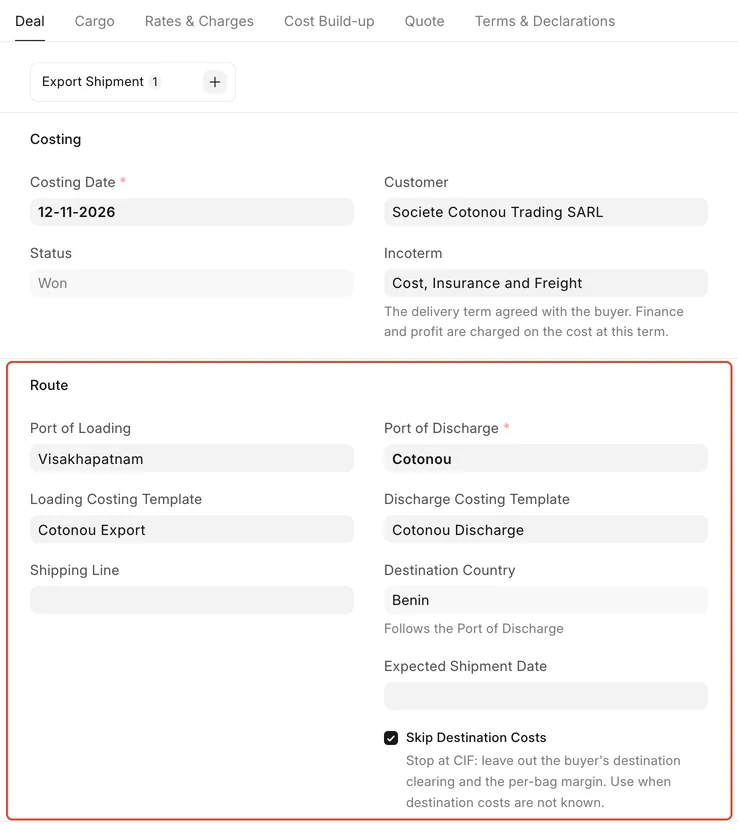
Read the Costing section:
| Field | What it means | Demo value |
|---|---|---|
| Costing Date | The day of the costing. The system uses the freight rates that are valid on this day. | the day the demo was installed |
| Status | The step the costing is at. The system sets it. See the table under Good to know. | Won |
| Customer | The buyer. | Societe Cotonou Trading SARL |
| Incoterm | The delivery term agreed with the buyer. Finance and profit are charged on the cost at this term. | Cost, Insurance and Freight |
- Read the Route section:
| Field | What it means | Demo value |
|---|---|---|
| Port of Loading | The Indian port where the containers go on the vessel. | Visakhapatnam |
| Loading Costing Template | The list of charges for this port of loading. The system copies its charges into the costing. | Cotonou Export |
| Shipping Line | The shipping line, if you want one line. The system then picks the loading template for this line, if one exists. | empty |
| Port of Discharge | The port of the buyer. | Cotonou |
| Discharge Costing Template | The list of charges at the port of discharge. | Cotonou Discharge |
| Destination Country | The country of the port of discharge. The system fills it. | Benin |
| Expected Shipment Date | The date the buyer wants the rice to sail. | empty |
| Skip Destination Costs | When ticked, the costing stops at CIF. It leaves out the buyer's clearing costs and the margin per bag. | ticked |
-
Read the Outcome section. It links the records that were made from this costing: the Quotation, the Sales Order and the Export Shipment. The story costing links all three.
-
Click the Cargo tab.
-
Read the Packing section:
- Container Type: 20' FCL (a 20-foot full container).
- No. of BL: 1. The number of bills of lading. Some charges are per bill of lading.
- Crop Year: the year the rice was harvested, if the buyer asks for it.
-
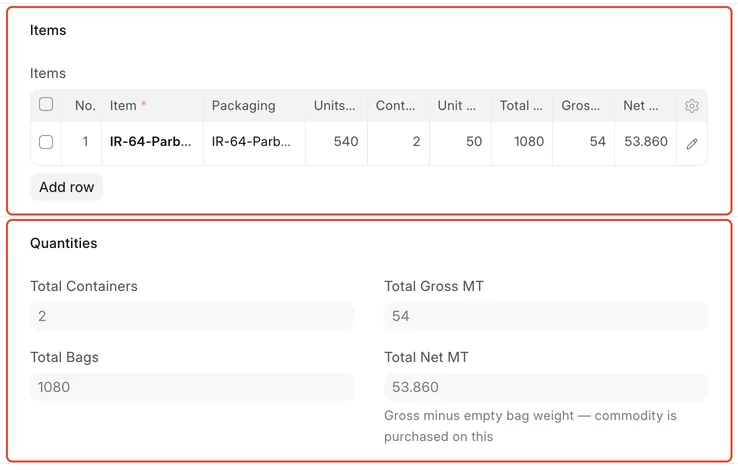
Read the row in the Items table:
| Column | What it means | Demo value |
|---|---|---|
| Item | The rice. | IR-64-Parboiled-10% |
| Packaging | The bag and how many bags go in one container. | IR-64-Parboiled-10%-50kg-20' FCL |
| Units / FCL | Bags in one container. | 540 |
| Containers | The number of containers. You type this value. | 2 |
| Unit Weight (Kg) | The rice in one bag. | 50 |
| Total Bags | Units / FCL × Containers. | 1080 |
| Gross MT | The weight of the bags full, in metric tons. | 54 |
| Net MT | Gross MT minus the weight of the empty bags. | 53.860 |
On your own costing, to cost a different quantity, change Containers and click Save. The system calculates the other columns again. Do not change the demo costings: the other pages use their values.
Check it worked
The Quantities section of the story costing shows Total Containers 2, Total Bags 1080, Total Gross MT 54 and Total Net MT 53.860.
Good to know
- The system sets the Status. You do not type it.
| Status | When |
|---|---|
| Draft | The costing is new. |
| Rates Received | Rates were pulled into the costing. |
| Costing Selected | A rate combination was selected, or you clicked Mark as Costed. See Pick the best combination. |
| Quoted | A quotation was made. See Send the quotation and proforma invoice. |
| Won | The Sales Order and the shipment were made. See Make the order and the shipment. |
| Lost | The buyer said no. See Record a lost deal. |
- You buy the rice from the mill by net weight. The purchase uses Total Net MT.
- To see the buyer's cost per bag in Cotonou, untick Skip Destination Costs. See The costing: Destination Margin tab.