
The rice goes to the port in bags. The administrator adds the bag as an item, so that the system can buy the bags and count their price in a costing.
At the end of this page, your bag is an item that you can select in the Bag field of an item packaging.
Before you start
- You need the Item Manager role to add or change an item. The demo user Priya can open items, but cannot change them. The Administrator user has all roles.
- The unit Kg and the bag size unit, for example 50 Kg Bag (130 g), must exist. See Currencies, exchange rates and units.
- The demo data has a finished bag item: PP Bag, with one variant PP Bag-White PP. See Install and remove demo data.
Steps
See the demo bag item
-
In the search bar, type Item and open the list. Open PP Bag.
-
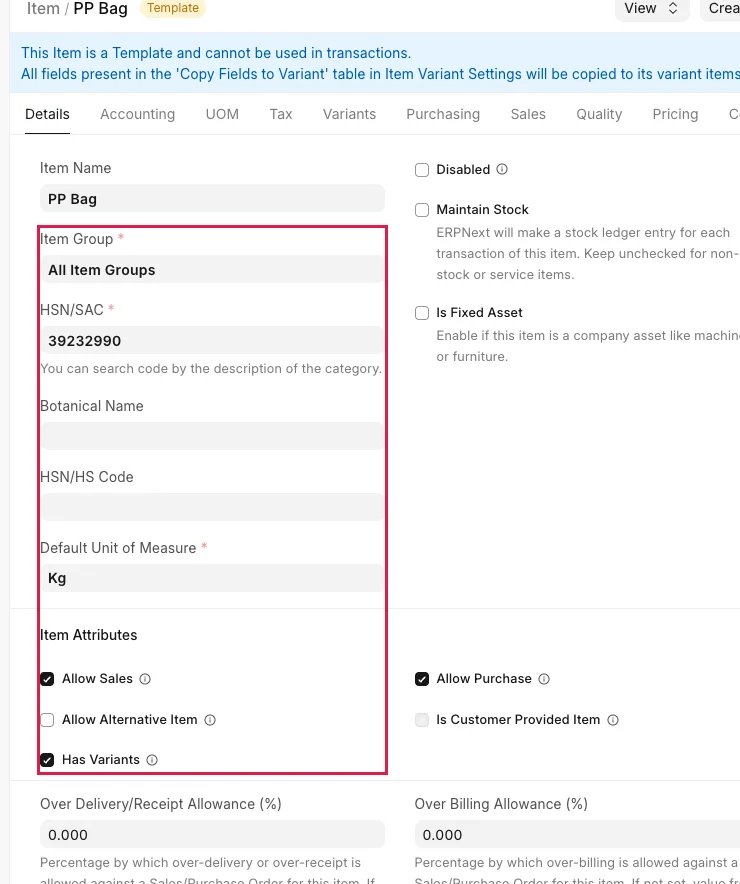
Look at the Details tab:
- HSN/SAC is 39232990.
- Default Unit of Measure is Kg, because the bag maker sells bag fabric by the kg.
- Has Variants is ticked. PP Bag is a template, and PP Bag-White PP is its variant for the fabric White PP.
-
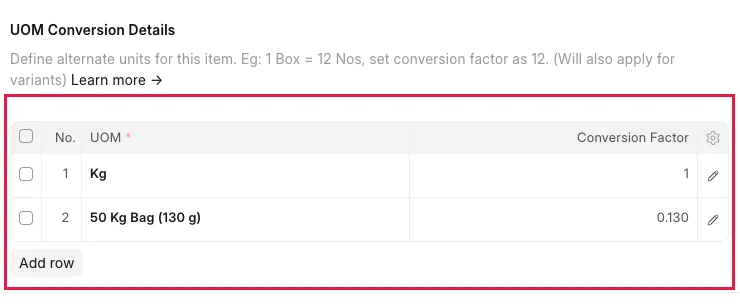
Open the UOM tab. The UOM Conversion Details table has two rows:
- Kg, with Conversion Factor 1.
- 50 Kg Bag (130 g), with Conversion Factor 0.13. One empty 50 kg bag weighs 130 g, that is 0.13 kg of fabric.
Add your bag item
-
Go back to the Item list and click Add Item. If a small dialog opens, click Edit Full Form.
-
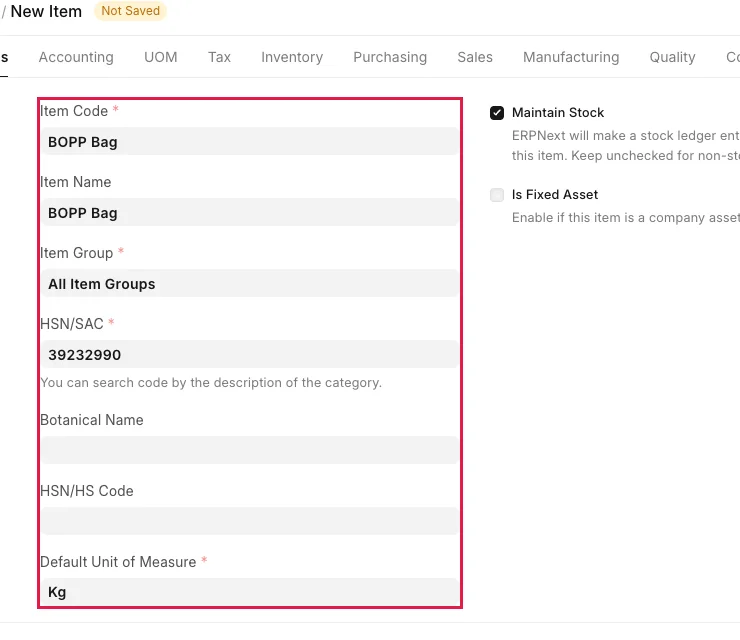
Type the Item Code, for example "BOPP Bag". Select an Item Group, type the HSN/SAC, and set Default Unit of Measure to Kg.
-
On the UOM tab, add a row for each bag size. The table below explains each field. Click Save.
-
If your bag comes in more than one fabric, make the item a template and add a variant for each fabric. See Rice items and variants. The steps are the same as for rice.
| Field | What it does |
|---|---|
| Item Code | The name of the bag. |
| Default Unit of Measure | Set it to Kg. The bag maker gives a price for each kg of fabric. |
| HSN/SAC | The GST code of the bag. For PP bags it is 39232990. |
| UOM Conversion Details (table, UOM tab) | Add one row for each bag size. UOM is the bag size, for example 50 Kg Bag (130 g). Conversion Factor is the weight of one empty bag in kg, for example 0.13. |
| Has Variants | Tick it only if the item is a template for more bag fabrics. |
Check it worked
-
In the sidebar, go to Masters > Item Packaging, and click Add Item Packaging (the check needs the System Manager role).
-
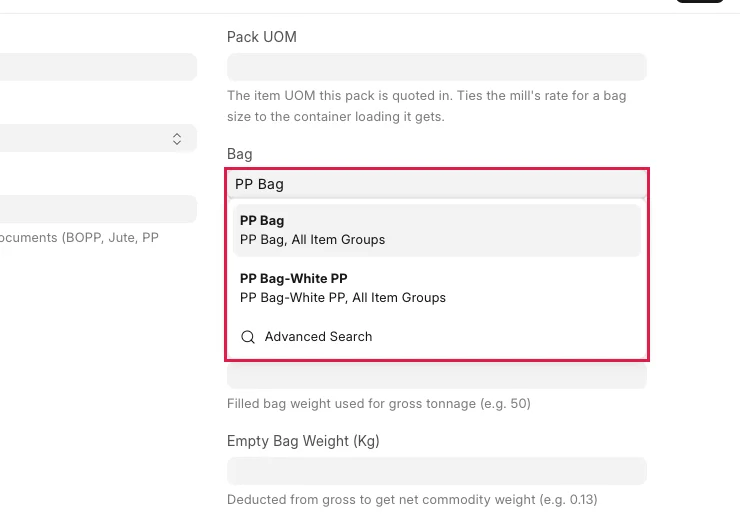
In Bag, type the name of your bag. Your bag and its variants show in the list. Press Escape and leave the form without saving.
The demo item packaging uses the variant PP Bag-White PP as its Bag. See Item packaging.
Good to know
- Put the bag sizes on the template item. A variant uses the bag sizes of its template. The system checks the Bag Pack of an item packaging against the bag sizes of the bag and of its template.
- The bag price comes from the rate template of the bag maker, which is on the template item PP Bag. See Add a bag supplier and Import mill rates.
- The system finds the fabric in each bag from the Conversion Factor. In the demo, one bag uses 0.13 kg of fabric.