
Currencies, exchange rates and units
The administrator turns on the currencies and the units that the costings use. The costing quotes the buyer in USD, adds some charges in EUR, and shows the costs at the port of discharge in CFA francs (XOF). The rice is priced per MT and packed in bags.
At the end of this page, USD, EUR and XOF are on, XOF shows the symbol CFA, the exchange rates come in, and the units Kg, MT, Bag, 50 KG and 50 Kg Bag (130 g) exist.
Before you start
- Do Company, address, bank account, fiscal year first.
- You need the System Manager role. To add an exchange rate, you also need the Accounts Manager role. To add a unit, you need the Item Manager role. The Administrator user has all roles.
- Open the demo records to see finished ones, then make yours.
Steps
Turn on the currencies
-
In the search bar, type Currency and open the list.
-
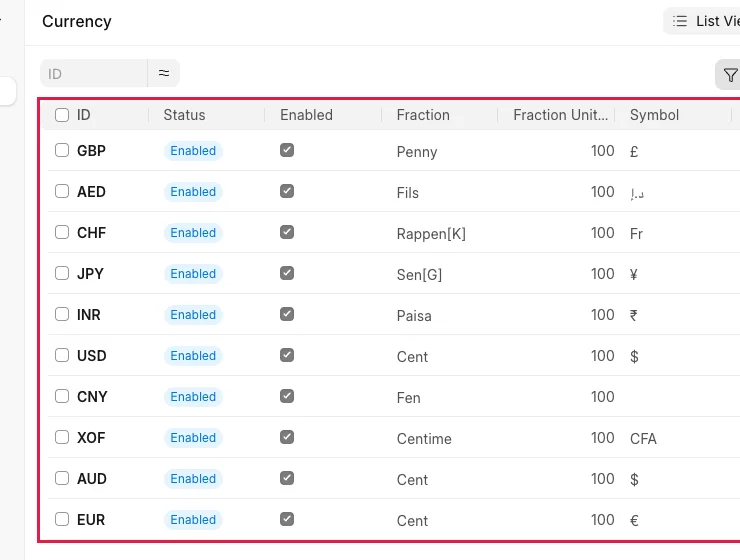
Open USD. Tick Enabled and click Save. Do the same for EUR and XOF.
On the demo, the list with the filter Enabled shows USD, EUR, XOF and the company currency INR, with some other currencies.
-
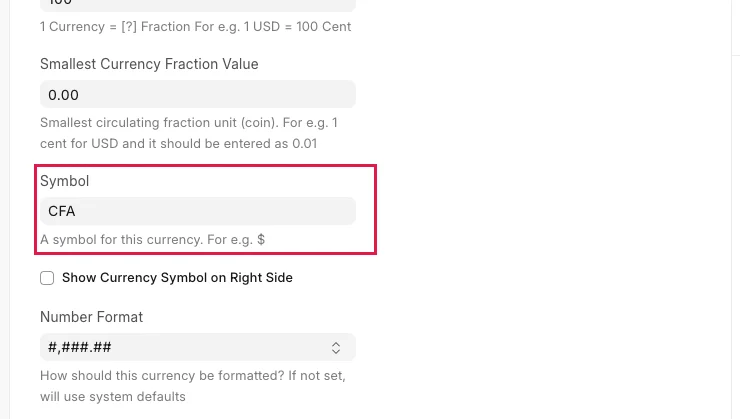
Open XOF. In Symbol, type CFA. Click Save. Now the amounts in XOF show as "CFA 1,000.00", not "XOF 1,000.00".
Get the exchange rates
A costing needs the rate in rupees of each foreign currency. When you make a new costing, the system fills the Exchange Rates table with today's rate of USD and EUR. It gets the rate in this order:
- The latest Currency Exchange record for the currency, on or before today.
- If no record exists, the exchange rate service in Currency Exchange Settings. On the demo, the service is frankfurter.dev - v2.
The demo has no Currency Exchange records. Its rates come from the service. To use a fixed rate, for example the rate of your bank, add a record:
-
In the search bar, type Currency Exchange and open the list. Click Add Currency Exchange.
-
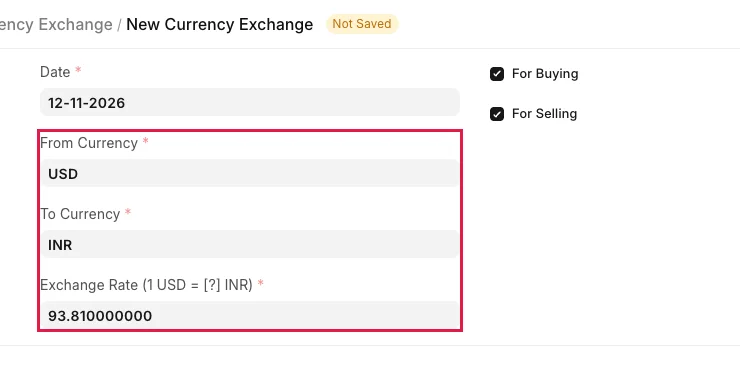
Fill the form:
- Date: the first day of the rate.
- From Currency: the foreign currency, for example USD.
- To Currency: INR.
- Exchange Rate (1 USD = [?] INR): the rate, for example 93.81.
- Keep For Buying and For Selling ticked.
-
Click Save. Do the same for EUR.
Add the units
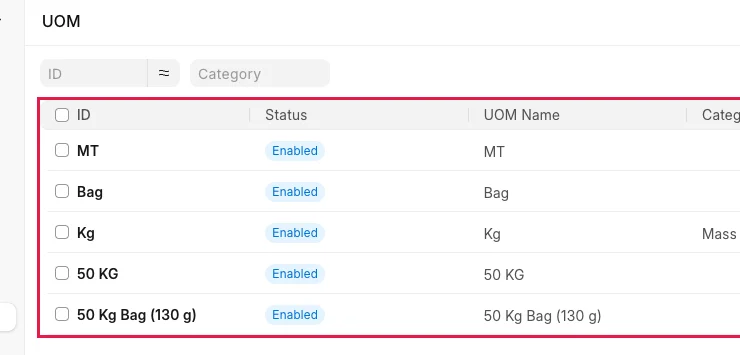
The costings and the stock use five units (UOM):
| Unit | Used for |
|---|---|
| Kg | The stock unit of the rice and of the bags. |
| MT | The rates, the prices and the weights of the costings and shipments. |
| Bag | The count of bags in a container. |
| 50 KG | The pack size of the rice in the mill rates. See Rice items and variants. |
| 50 Kg Bag (130 g) | The empty bag, by its weight. See Bag items. |
-
In the search bar, type UOM and open the list. Search for each unit in the table.
-
If a unit does not exist, click Add UOM. Type the UOM Name exactly as in the table, and click Save.
Check it worked
- Make a costing from the board as in Create a costing from the board.
- Open the costing. On the Rates & Charges tab, the Exchange Rates section shows a row for USD and a row for EUR. Base Rate (INR) shows the rate of today. See The costing: Rates & Charges tab.
If Base Rate (INR) is 0, the system did not get a rate. Add a Currency Exchange record for the currency (steps 4 to 6), or type the rate in the row.
Good to know
- The costing changes EUR to CFA with the fixed rate CFA Francs per EUR in Export Settings, not with a Currency Exchange record. See Export Settings.
- Keep the company currency INR. The costings change every foreign amount to rupees.
- Do not delete or rename a unit that items or rates use. Make a new unit.