
Sign in to the supplier portal
Suresh Rao owns Sri Venkateswara Rice Mill. Every day he tells Navchetan Agro Exports the price of his rice. He does this on the supplier portal, a page that works on his phone.
At the end of this page, you can sign in and open the Your rates page of your mill.
Before you start
- Navchetan Agro Exports gives you a login for the portal. You need your email address and your password. See Give a mill access to the supplier portal.
- Use the browser on your phone or on your computer. The pictures on this page are from a phone.
Steps
-
In the browser, open the site address with /supplier at the end, for example
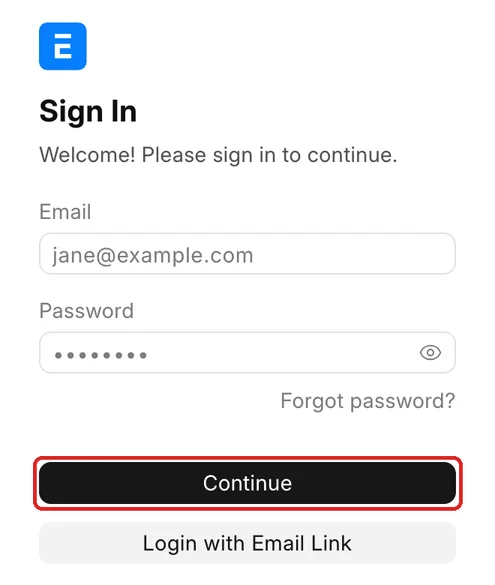
https://your-site/supplier. The Sign In page opens. -
Enter your Email and your Password.
-
Tap Continue.
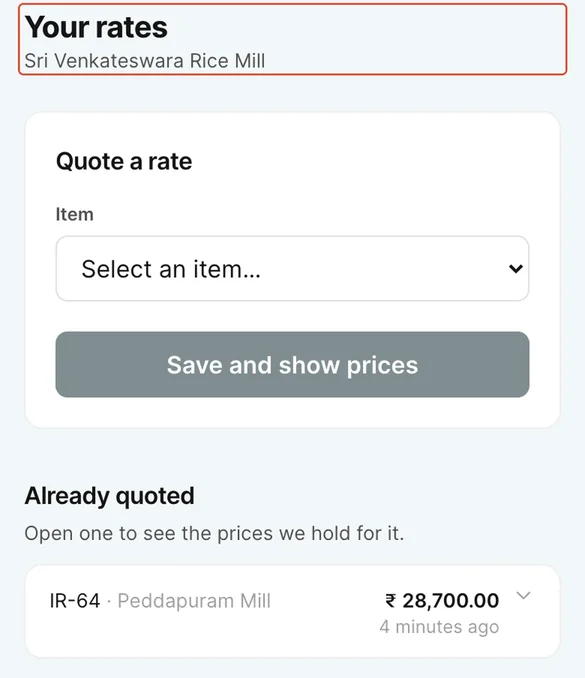
The Your rates page opens. Under the heading, it shows the name of your mill.
-
Read the parts of the page:
| Part | What it is for |
|---|---|
| Quote a rate | Give your price of today. See Quote today's rate. |
| Already quoted | Shows after your first quote. The prices that you gave before, newest first. Tap one to see the prices that Navchetan Agro Exports holds for it. |
Check it worked
The Your rates page shows the name of your mill, for example Sri Venkateswara Rice Mill, and the Quote a rate box.
Good to know
- Save the /supplier address as a bookmark on your phone. When you are signed out, it opens the Sign In page first, then Your rates.
- If the page shows Nothing to quote yet, Navchetan Agro Exports has not opened an item to you. Call them.
- If the page shows No supplier linked to this account, your login is not linked to your mill. Call Navchetan Agro Exports.
- Forgot your password? Tap Forgot password? on the Sign In page.
Next
Last updated 2 weeks ago
Was this helpful?