
Contract and heap inspection templates
A quality inspection template is a list of the quality limits for the rice, for example the moisture and the broken grains. The administrator keeps two templates for each rice item:
- The contract template has the quality that you promise the buyer, in words, for example "14% Max".
- The heap template has the limits that the inspector checks at the mill, as numbers. The inspector types a reading for each line, and the system checks it against the limits.
At the end of this page, a new heap inspection of your rice fills its readings from your heap template.
Before you start
- You need the System Manager role for the templates, and the Item Manager role to change the rice item. The demo user Priya can open items, but cannot change them. The Administrator user has all roles.
- The rice item must exist. See Rice items and variants.
- The demo data has two finished templates: IR64 Export Spec (contract) and IR64 Export Spec Heap (heap). See Install and remove demo data.
Steps
See the demo heap template
-
In the search bar, type Quality Inspection Template and open the list. Open IR64 Export Spec Heap.
-
Look at the Item Quality Inspection Parameter table. Each row is one check. For the row Moisture, Numeric is ticked and the Maximum Value is 14. A heap with more than 14% moisture fails this check.
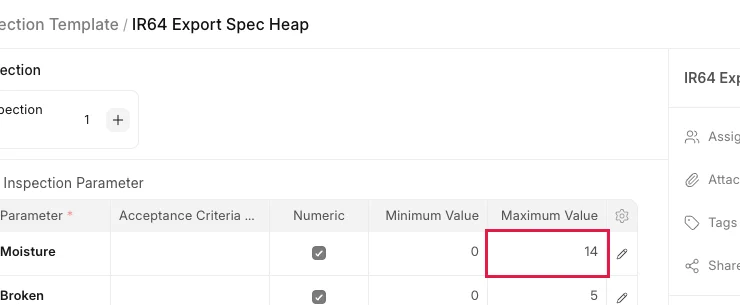
The demo heap template has numeric limits for Moisture (max 14), Broken (max 5), Damage & Discolour (max 2), Foreign Matter (max 0.5) and Length (5.9 to 10). The other rows, for example Chalky, are not numeric and have no limit on the template.
See the demo contract template
-
Go back to the list and open IR64 Export Spec. Here Numeric is not ticked. Each row has its limit as text in Acceptance Criteria Value, for example Moisture "14% Max" and Broken "5%".
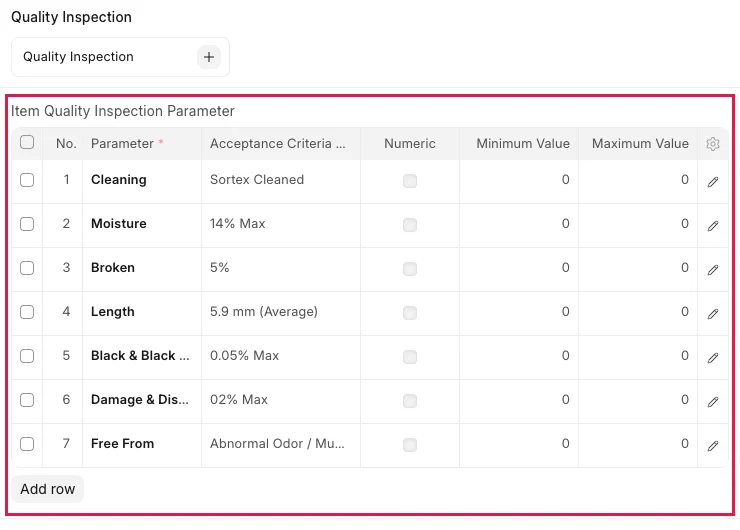
Add your template
-
Go back to the list and click Add Quality Inspection Template.
-
Type the Quality Inspection Template Name. Put "Heap" at the end of the name of a heap template, so that you can find it easily.
-
In the table, click Add row for each check, and fill the fields in the table below.
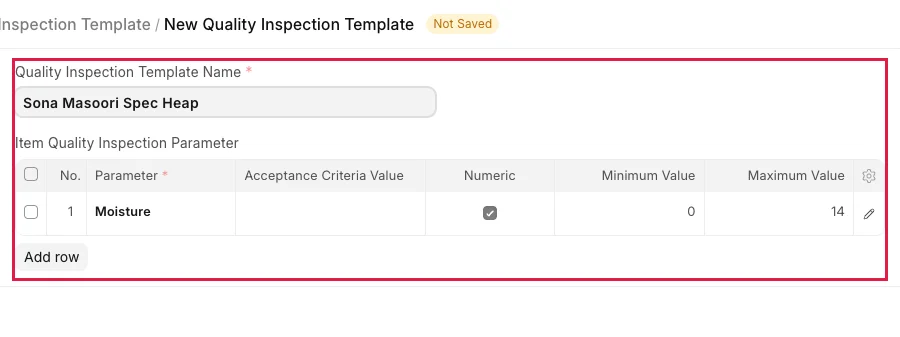
-
Click Save.
| Field | What it does |
|---|---|
| Parameter | The check, for example Moisture. If a check is not in the list, type Quality Inspection Parameter in the search bar, then click Add Quality Inspection Parameter. |
| Numeric | Tick it when the inspector types a number. Use it for the heap template. |
| Minimum Value, Maximum Value | Show when Numeric is ticked. The lowest and the highest reading that passes. |
| Acceptance Criteria Value | Shows when Numeric is not ticked. The limit as text, for example "14% Max". Use it for the contract template. |
Set the templates on the rice item
-
Open the rice item. Use the template item, for example IR-64, not a variant.
-
On the Quality tab, set Quality Inspection Template to the contract template and Heap Inspection Template to the heap template. Click Save.
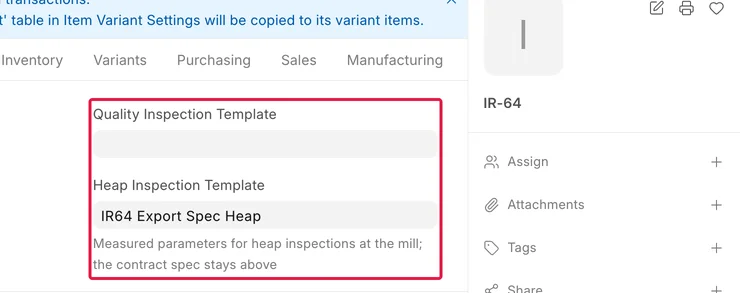
When you save the template item, the system copies Quality Inspection Template and Heap Inspection Template to each variant, because Item Variant Settings lists these fields. See Rice items and variants.
Check it worked
- Open a variant of the rice, for example IR-64-Parboiled-10%. Its Heap Inspection Template shows your heap template.
When Priya adds a heap, its readings fill from this template. See Add a heap.
Good to know
- In the demo, IR-64 has only the Heap Inspection Template set. Quality Inspection Template is empty.
- A change to a template is used by the inspections that you make after the change. The inspections that exist keep their readings.