
The mill has the first heap ready. It holds enough rice for both containers.
At the end of this page, the plan has one heap that covers 2 containers, and Ravi has it in his list.
Before you start
Finish Assign the day. The rice Purchase Order of the shipment is submitted (see From a new shipment to the vessel). The pictures on this page show the Planned shipment (SHIP-2026-0055).
Steps
-
In the search bar, type Stuffing Plan and open the plan of the Planned shipment (STP-2026-0009). Click Inspections > Add Heap.
-
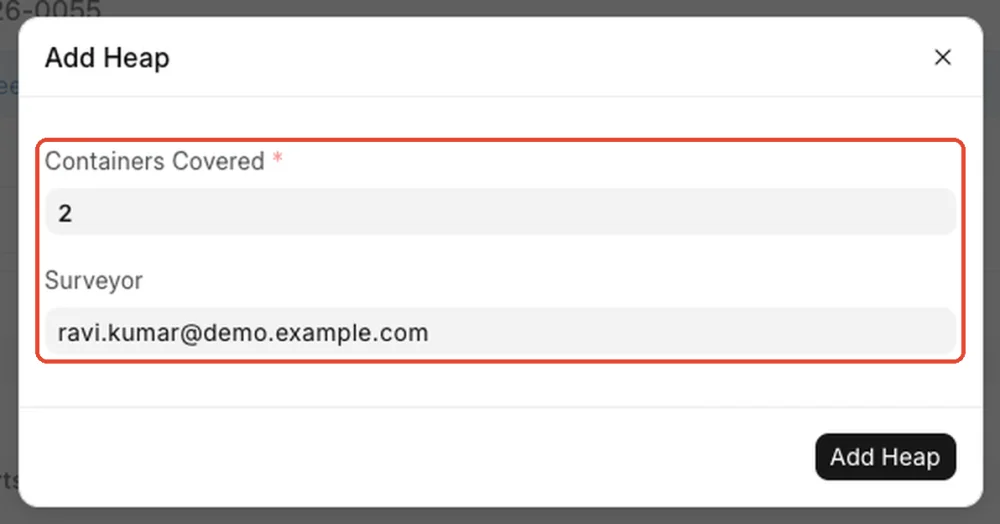
In the Add Heap dialog, enter the values:
- Containers Covered: 2.
- Surveyor: type ravi and pick ravi.kumar@demo.example.com. If today is a loading day, the system fills this field with the Default Surveyor of that day.
-
Click Add Heap. A green message shows "Heap inspection MAT-QA-2026-… added".
Check it worked
- Ravi signs in (see Ravi's quick start). In the My Inspections workspace, he clicks Heap Inspections and sees the new heap.
- The new heap shows with the status Rejected. This is correct. A heap with no readings is Rejected until Ravi fills them.
- On the shipment, the status is Inspecting.
To see a heap that is added already, look at the heap of the Inspecting shipment (MAT-QA-2026-00009).
Good to know
When you add a heap, the system does these things:
- It makes a draft Purchase Receipt for the heap from the rice Purchase Order. The quantity is the net weight of the rice for the containers it covers. For the 2 containers of the Inspecting shipment, it is 53.86 MT, the net weight of the shipment. The receipt goes to the Receiving Warehouse of Export Settings.
- It fills the heap readings from the Heap Inspection Template of the rice item.
- It assigns the heap to the surveyor. If you leave Surveyor empty, the heap is set to you, and it shows in no surveyor's list.
| Message | What to do |
|---|---|
| Submit the Purchase Order first: … is still a draft. | Submit the rice Purchase Order of the shipment. |
| Create the Purchase Order first: Export Shipment … has no rice order to the mill. | On the shipment, click Create > Purchase Orders. |
| Set the Receiving Warehouse in Export Settings before receiving rice from the mill. | Fill Receiving Warehouse in Export Settings. |
| A heap must cover at least one container. | Enter 1 or more in Containers Covered. |
| Add container rows to Export Shipment … first. | On the shipment, add the containers. |