
Each morning the mills and the bag supplier send their rates by phone, chat or email. Priya, the export coordinator, puts the rates of all the suppliers in one spreadsheet and imports it. The system then prices the rice at each port for today.
At the end of this page, today's rates show on the Cheapest Port Board.
Before you start
- Finish Add a rice mill and Add a bag supplier. Each supplier needs a rate template.
- You need the System Manager or the Purchase Manager role. Priya has both.
- A mill that has portal access can send its rate itself. See Give a mill access to the supplier portal.
- The pictures show the import screen before an import, and the demo rate of Sri Venkateswara Rice Mill (SIR-2026-00001).
Steps
-
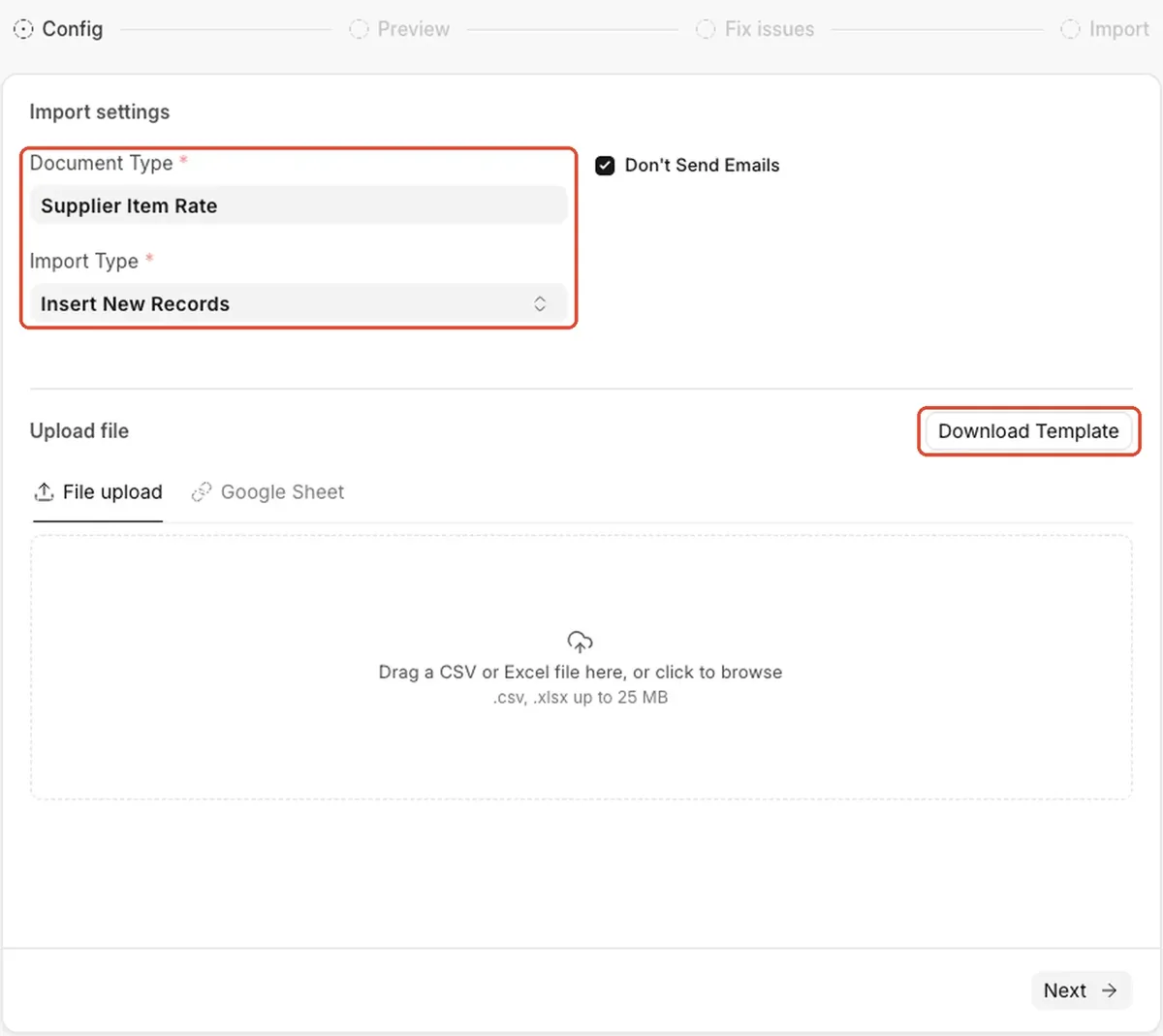
On the Export Management workspace, in the section Data, click Import Today Mill Rates. A new Data Import opens on the step Config. Document Type shows Supplier Item Rate and Import Type shows Insert New Records.
-
The first time, click Download Template. The Export Data dialog opens.
-
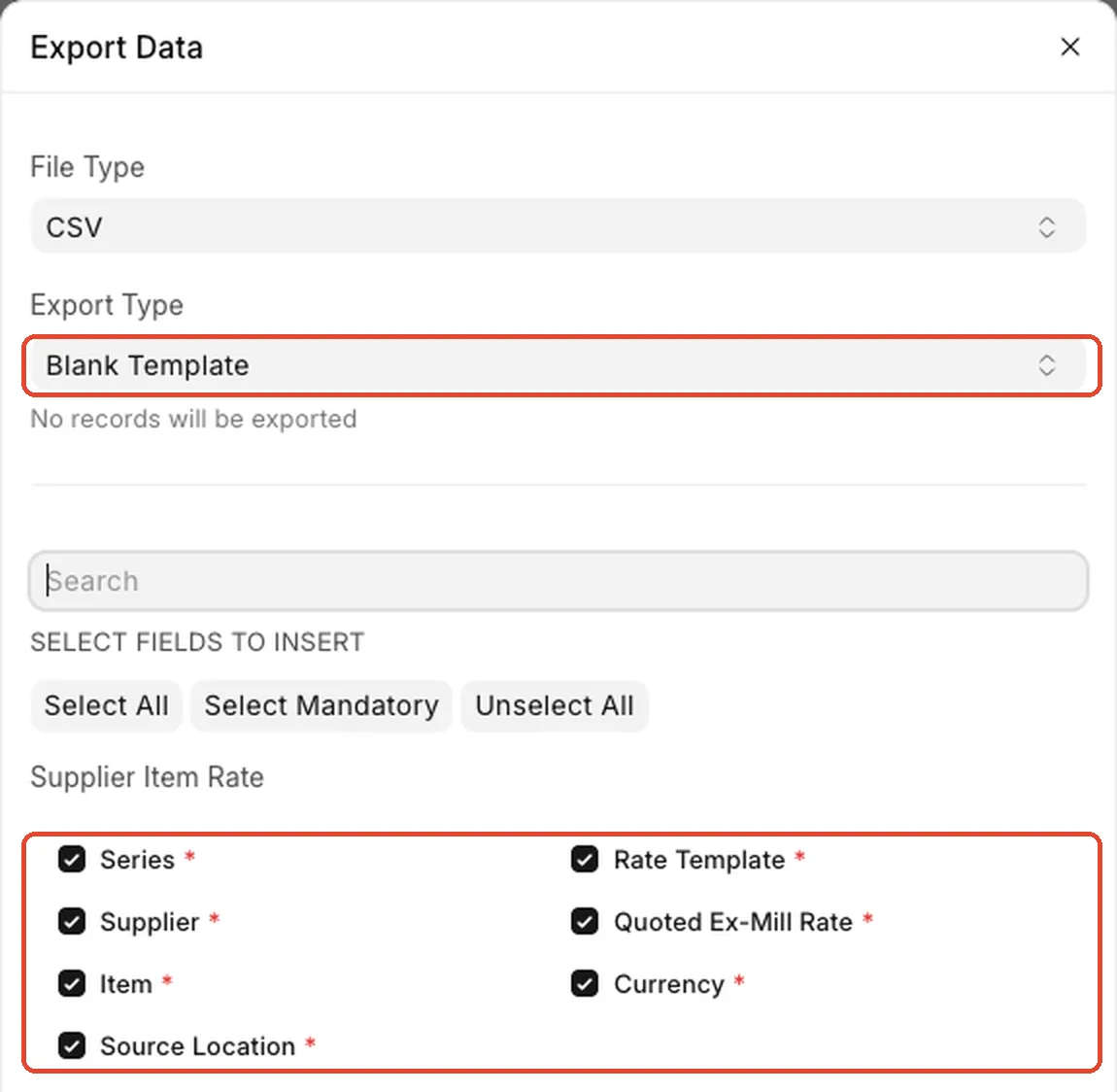
In File Type, select CSV or Excel. Keep Export Type as Blank Template. Keep the ticked fields of Supplier Item Rate: Series, Supplier, Item, Source Location, Rate Template, Quoted Ex-Mill Rate and Currency. Click Export. The system downloads the blank file.
-
Open the file in your spreadsheet program. Type one row for each supplier that sent a rate today. Keep the same file for the next days.
| Series | Supplier | Item | Source Location | Rate Template | Quoted Ex-Mill Rate | Currency |
|---|---|---|---|---|---|---|
| SIR-.YYYY.- | Sri Venkateswara Rice Mill | IR-64 | Peddapuram Mill | IR-64-Sri Venkateswara Rice Mill-Peddapuram Mill | 28700 | INR |
| SIR-.YYYY.- | Annapurna Agro Mills | IR-64 | Anakapalle Mill | IR-64-Annapurna Agro Mills-Anakapalle Mill | 29700 | INR |
| SIR-.YYYY.- | Sunrise Polymers | PP Bag | Sunrise Polymers Plant | PP Bag-Sunrise Polymers-Sunrise Polymers Plant | 165 | INR |
- Series: type SIR-.YYYY.-. It is the only choice.
- Rate Template: the name of the rate template of the supplier. You can leave it empty. The system then finds the rate template from Supplier, Item and Source Location.
- Item: the item of the rate template, for example the rice item IR-64, not one of its grades.
- Quoted Ex-Mill Rate: the rate per MT at the gate of the mill, for the grade and the pack that have the amount 0 on the rate template. For the bag supplier, the rate for each kg of fabric.
- Currency: the currency of the rate template.
- Save the file. On the step Config, in Upload file, drag the file into the box, or click the box and select the file.
- Click Next. The step Preview shows the rows of the file. Check the suppliers and the rates.
- Click Next. The step Fix issues shows the rows that have a problem. Correct the file and upload it again if a row has a problem.
- Click Import. The step Import shows the progress and then the result for each row.
Check it worked
-
In the search bar, type Supplier Item Rate and open the list. The list shows one new rate for each row of the file.
-
Open the rate of a mill. The section Rates shows the price of each pack at the mill gate (Ex Mill) and at each port. The system adds the charges of the rate template to the quoted rate.
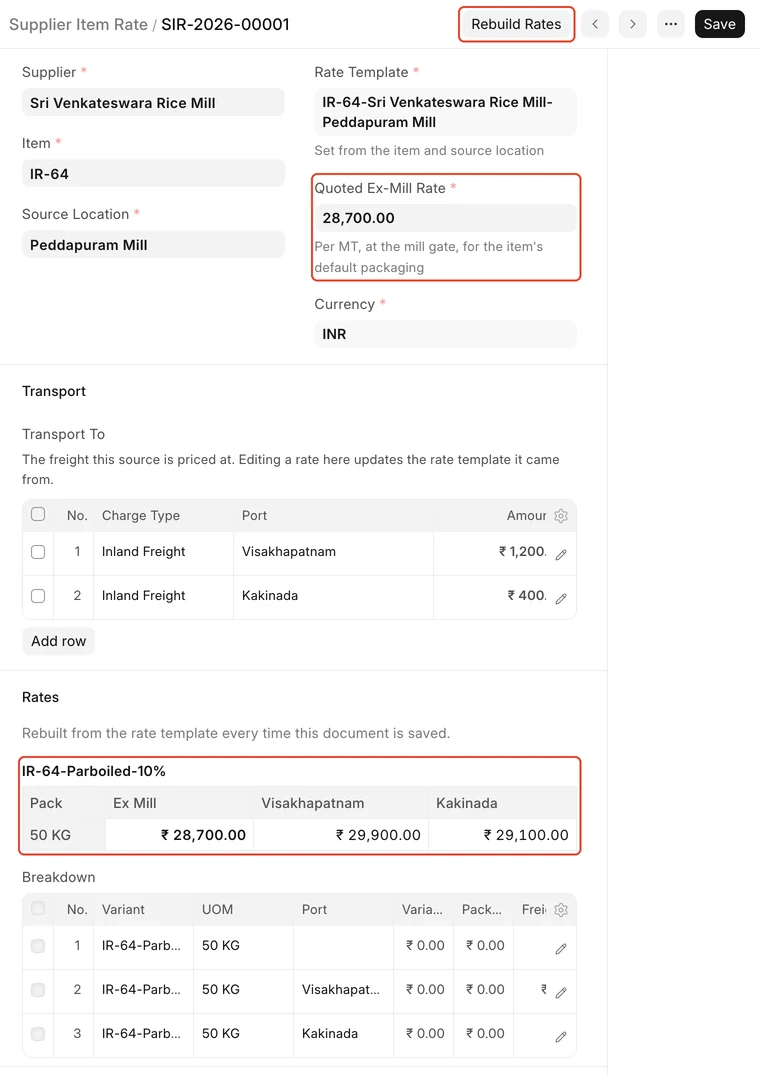
In the demo, Sri Venkateswara Rice Mill quotes ₹ 28,700. With the truck freight, the price is ₹ 29,900 at Visakhapatnam and ₹ 29,100 at Kakinada.
-
Open the Cheapest Port Board. The table of mills shows quoted today in the Quote column for each mill with a new rate.
Good to know
- A supplier has one rate for each item, supply location and day. A second rate for the same day stops with the message "… already holds rates for …". To correct today's rate, open it, change Quoted Ex-Mill Rate and click Save.
- On a rate, the table Transport To shows the truck freight to each port. A change in this table also changes the rate template.
- When you change the rate template, open today's rate and click Rebuild Rates. The system prices the rate again with the new charges.
- To enter one rate by hand, open the Supplier Item Rate list and click Add Supplier Item Rate. Select the Supplier, the Item and the Source Location. Rate Template fills itself. Type the Quoted Ex-Mill Rate and click Save.
- Keep Don't Send Emails ticked on the import.