
The costing: Destination Margin tab
The buyer in Cotonou sells the rice again, by the bag, in CFA francs. The Destination Margin tab shows what one bag costs the buyer when it is cleared in Cotonou, and how much the buyer earns on it. A buyer with a good margin is more likely to say yes to your price.
At the end of this page, you can read the buyer's cost and margin per bag in EUR and in USD.
Before you start
- Read The costing: Rates & Charges tab.
- The costing needs a Port of Discharge and a Discharge Costing Template on the Deal tab. See Costing templates.
- In the demo, open the Won costing of the story (JMC-PI-2627-017).
Steps
-
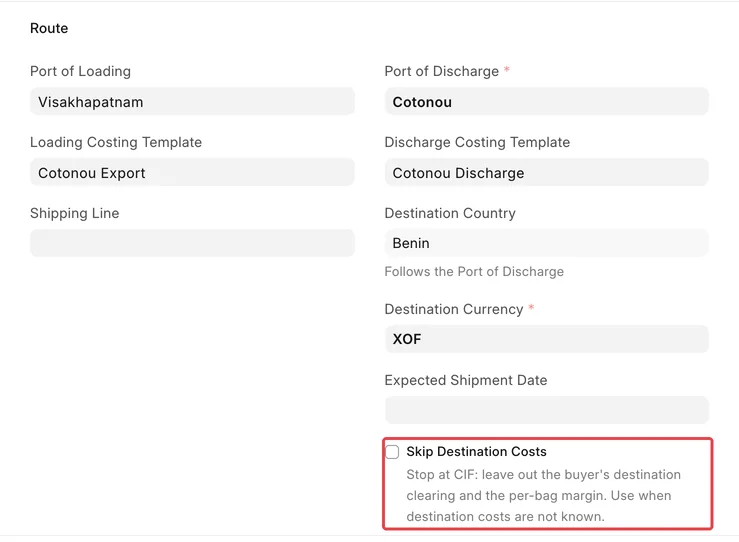
Open the costing. On the Deal tab, untick Skip Destination Costs. The Destination Margin tab shows.
-
Click Save. The system calculates the costs at the port of discharge.
-
Click the Destination Margin tab.
-
In the Setup section, type the Present Selling Price per Bag. This is the price of one bag in the Cotonou market today, in CFA francs. In the demo it is 18,500.
-
Click Save.
-
Read the Per Bag — EUR section. It shows the cost when the buyer pays you in EUR.
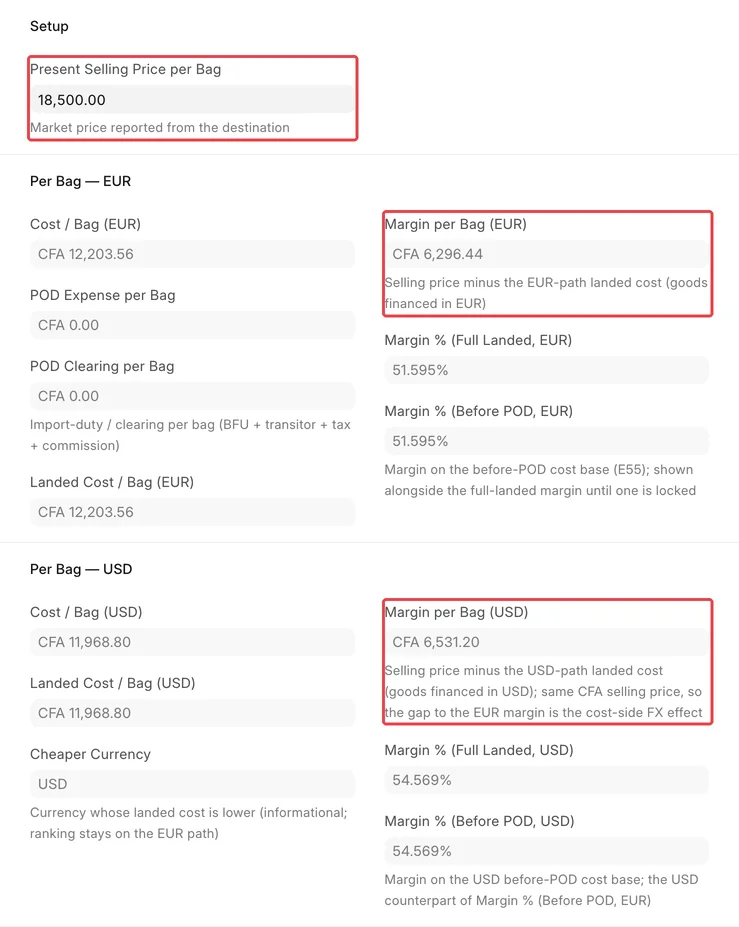
| Field | What it means |
|---|---|
| Cost / Bag (EUR) | Your CFR cost of one bag (rice and sea freight), changed to CFA through EUR. |
| POD Expense per Bag | The charges at the port of discharge for one bag. |
| POD Clearing per Bag | The import duty and clearing for one bag. |
| Landed Cost / Bag (EUR) | The full cost of one bag for the buyer, in Cotonou. |
| Margin per Bag (EUR) | Present Selling Price per Bag minus Landed Cost / Bag. |
| Margin % (Full Landed, EUR) | The margin as a percentage of the landed cost. |
| Margin % (Before POD, EUR) | The margin before the costs at the port of discharge. |
In the picture, POD Expense per Bag and POD Clearing per Bag are 0, and the margin is about 52 %. The story costing is saved with Skip Destination Costs ticked, so the system did not add the costs at the port of discharge. Landed Cost / Bag (EUR) is then only the CFR cost: the goods, the charges at the port of loading and the sea freight. When you untick Skip Destination Costs and click Save, the system adds POD Expense per Bag and POD Clearing per Bag to Landed Cost / Bag (EUR). The landed cost goes up, so your margin is lower than the margin in the picture. New costings have Skip Destination Costs ticked by default.
-
Read the Per Bag — USD section. It shows the same values when the buyer pays you in USD. Cheaper Currency shows which currency gives the buyer the lower landed cost.
-
If the import duty changes, update the Import Duty — Lane Params section, then click Save:
- Customs Duty Rate: the official EUR to CFA rate for customs.
- Convertable Duty Rate: the bank EUR to CFA rate.
- BFU %, Tax %: the duty rates. Type a fraction: 0.20 for 20 %, 0.025 for 2.5 %.
- Transitor per Container: the clearing agent's fee for one container.
- Commission per Bag: the commission for one bag.
The Import Duty — Build-up section shows how the system calculates the duty from these values.
Check it worked
The Per Bag — EUR and Per Bag — USD sections show a Margin per Bag and a Margin %.
Good to know
- Tick Skip Destination Costs when you do not know the costs at the port of discharge. The costing then stops at CIF, and this tab does not show.
- Customs Duty Rate and Convertable Duty Rate come from Export Settings. BFU %, Tax %, Transitor per Container and Commission per Bag come from the Discharge Costing Template. You can change them on one costing. The change stays on that costing only.