
Watch progress and warnings
Priya is at her desk in the office. She follows the loading from the stuffing plan.
At the end of this page, you know how far the loading is and what is late.
Before you start
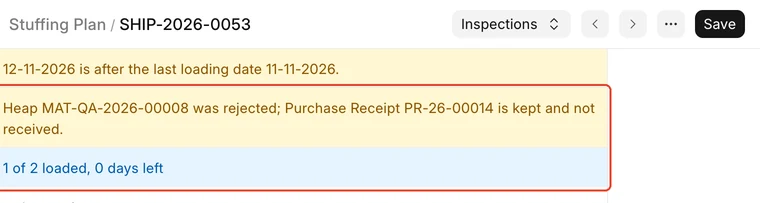
Finish Load and seal. Priya signs in as shown in Sign in and find your way. The picture on this page shows the stuffing plan of the Loading shipment (SHIP-2026-0053). Its first container is Loaded & Sealed, its second container is still in Loading, and it has a rejected heap.
Steps
-
In the search bar, type Stuffing Plan and open the plan of the Loading shipment. The plan shows the shipment number at the top (SHIP-2026-0053).
-
Read the blue line under the title. On this plan it shows "1 of 2 loaded, 0 days left". "0 days left" means the Last Loading Date of the shipment has passed. When that date is still ahead, the line also shows "need …/day". For example, the plan of the Inspecting shipment shows "0 of 2 loaded, 8 days left, need 1/day".
-
Read the yellow lines above the blue line. Each yellow line is a warning. This plan shows two:
- "12-11-2026 is after the last loading date 11-11-2026." The second loading day is after the Last Loading Date.
- "Heap MAT-QA-2026-00008 was rejected; Purchase Receipt PR-26-00014 is kept and not received."
-
In the search bar, type Export Shipment and open the Loading shipment. Read the blue line at the top of the form. It shows "Status: Loading · Documents: 0/12 final · Readiness: Partially Ready". The Status field is in the Deal tab.
-
Open the Progress tab. Under Readiness, read Readiness (Partially Ready), Required Containers (2) and Required Net MT (53.860).
Check it worked
After the second container is Loaded & Sealed, the blue line shows "2 of 2 loaded". The Ready to Ship shipment (SHIP-2026-0052) is in this state: its stuffing plan shows "2 of 2 loaded, 0 days left", and its status is Ready to Ship.
Good to know
The blue line counts containers in Loaded & Sealed or a later step. "Days left" counts to the Last Loading Date of the shipment, today included. The Last Loading Date and the Free Pickup Date are on the shipment's Booking tab. The system sets Free Pickup Date to 9 days before the Gate Open Date.
| Yellow warning | What it means |
|---|---|
| … is after the last loading date … | A loading day is after the Last Loading Date. Move the day or ask the shipping line for more time. |
| … is before the free pickup date … | A loading day is before the Free Pickup Date. Move the day or change the Gate Open Date, or check the pickup terms with the shipping line. |
| Heap … was rejected; Purchase Receipt … is kept and not received. | Priya submitted a rejected heap. The yellow line stays. Add a new heap for its containers. |