
Accept or reject the heap
Ravi sends his readings. Priya reads them and decides if the rice can go into the containers.
At the end of this page, the heap is submitted. If it is Accepted, the containers can go to Loading after their empty check.
Before you start
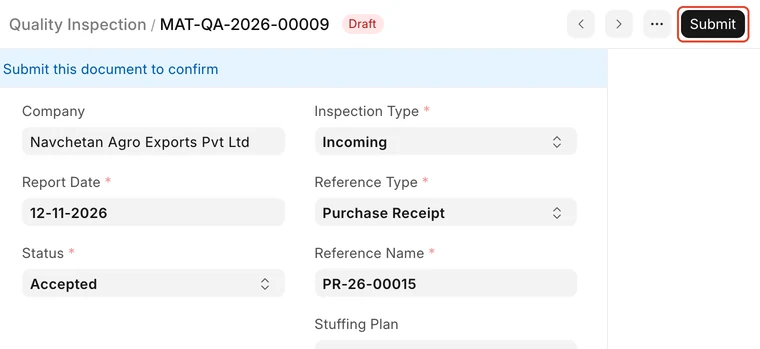
Finish Inspect the heap. Priya signs in as shown in Sign in and find your way. She has the role that accepts heaps. The picture on this page shows the draft heap of the Inspecting shipment.
Steps
-
In the search bar, type Quality Inspection and open the heap of the Inspecting shipment (MAT-QA-2026-00009). The heap shows Draft at the top.
-
Read the Status and the Readings table. In this heap, the Status is Accepted.
-
If the Status is Accepted, click Submit at the top right.
-
If the Status is Rejected and you accept the rice anyway, do these steps:
- Tick Manual Inspection.
- Set Status to Accepted.
- In Override Reason, type why, for example "Moisture 14.5 in one sample. The mill dried the heap again."
- Click Save, then click Submit.
-
If the Status is Rejected and you do not accept the rice, click Submit.
Check it worked
The heap shows Submitted at the top, in place of Draft. For an accepted heap, the containers can go to Loading after their empty check.
Good to know
When you submit a Rejected heap, the system writes a note in the Remarks of the heap's draft Purchase Receipt: "Heap rejected in …; not received". The stuffing plan also shows a yellow warning: "Heap … was rejected; Purchase Receipt … is kept and not received." The draft Purchase Receipt stays, and the system does not receive the rice.
The Loading shipment has a heap that Kiran sent and Priya rejected (MAT-QA-2026-00008). It covers one container. You can open it to see how a submitted, Rejected heap looks.
To load the containers of a rejected heap, add a new heap for them. See Add a heap.
| Message | What to do |
|---|---|
| Attach … before submitting the heap inspection. | Ask Ravi to attach the photos, or attach them yourself. |
| Enter an Override Reason to accept a heap with rejected readings. | Fill Override Reason. |