
Every page of this guide follows one story, on the records of the demo data. This page tells you the story and the people in it.
At the end of this page, you can find the won costing and the shipped shipment of the story.
Before you start
Finish Sign in and find your way.
The story
Navchetan Agro Exports sells IR64 parboiled rice (IR64 PB Rice 10%) in 50 kg bags. A buyer in Benin, Societe Cotonou Trading SARL, orders 2 containers to Cotonou.
Priya checks the Cheapest Port Board and picks the port of Visakhapatnam. She makes a costing with rice from Sri Venkateswara Rice Mill, quotes the buyer and wins the deal. Then she makes the Sales Order and the shipment. The mill fills the bags, the inspection agency checks the rice and the containers, and the containers sail on the vessel MSC ANYA.
flowchart TD
    A[Cheapest Port Board] --> B[Export Costing]
    B --> C[Quotation and proforma invoice]
    C --> D[Sales Order and Export Shipment]
    D --> E[Stuffing Plan]
    E --> F[Inspections]
    F --> G[Shipped]
The people
| Person | Who they are | What they do in the guide |
|---|---|---|
| Priya Sharma | Export coordinator at Navchetan Agro Exports | Costs the deal, runs the shipment, adds the suppliers and accepts each heap (a lot of bagged rice at the mill). Chapters 1 to 4. |
| Suresh Rao | Owner of Sri Venkateswara Rice Mill | Sends his rice rates through the supplier portal. Chapter 5. |
| Anil Varma | Contact at the bag supplier Sunrise Polymers | Supplies the bags. He does not sign in. |
| Meena Reddy | Manager at the inspection agency | Sends the surveyors to the mill on the correct days. Chapters 3 and 6. |
| Ravi Kumar and Kiran Das | Surveyors at the inspection agency | Inspect the rice and the containers at the mill. Chapters 3 and 6. |
| The administrator | Sets up the system | Settings and users only. Chapters 7 and 8. |
Steps
-
On the Export Management workspace, click Export Shipment. The list shows the five demo shipments, one for each status.
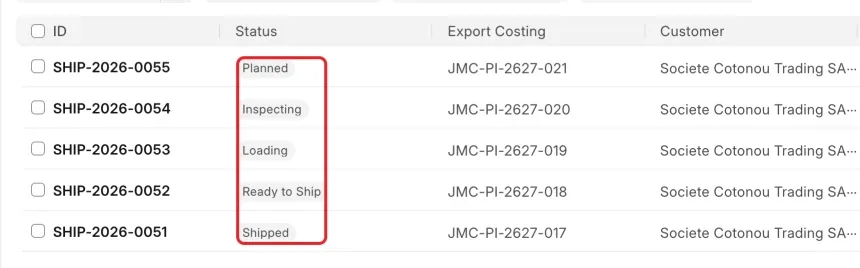
| Status | Shipment | From | Mill |
|---|---|---|---|
| Shipped | SHIP-2026-0051 | Visakhapatnam | Sri Venkateswara Rice Mill |
| Ready to Ship | SHIP-2026-0052 | Kakinada | Annapurna Agro Mills |
| Loading | SHIP-2026-0053 | Gangavaram | Sri Venkateswara Rice Mill |
| Inspecting | SHIP-2026-0054 | Visakhapatnam | Annapurna Agro Mills |
| Planned | SHIP-2026-0055 | Chennai | Sri Venkateswara Rice Mill |
The story shipment is the Shipped one. The other four show the same work at an earlier step.
- Click the Shipped shipment. Export Costing shows the costing it came from: the Won costing of the story (JMC-PI-2627-017), from Visakhapatnam to Cotonou.
- Click Home in the left sidebar, then click Export Costing. The list shows seven costings:
- five Won costings, one for each shipment. One of them is the costing of the story;
- one Quoted costing from Visakhapatnam (JMC-PI-2627-015), for 10 containers. The buyer has not said yes yet;
- one Lost costing from Chennai (JMC-PI-2627-016). The buyer took a lower offer from another exporter.
Check it worked
You can open the Won costing of the story and the Shipped shipment.
Good to know
- The numbers of the records on your site can be different from the numbers in this guide. Find each record by its status, then its port, then its mill:
| The guide says | Status | Port of loading | Mill | Number in this guide |
|---|---|---|---|---|
| The story costing | Won | Visakhapatnam | Sri Venkateswara Rice Mill | JMC-PI-2627-017 |
| The Quoted costing | Quoted | Visakhapatnam | – | JMC-PI-2627-015 |
| The Lost costing | Lost | Chennai | – | JMC-PI-2627-016 |
| The Shipped shipment | Shipped | Visakhapatnam | Sri Venkateswara Rice Mill | SHIP-2026-0051 |
| The Ready to Ship shipment | Ready to Ship | Kakinada | Annapurna Agro Mills | SHIP-2026-0052 |
| The Loading shipment | Loading | Gangavaram | Sri Venkateswara Rice Mill | SHIP-2026-0053 |
| The Inspecting shipment | Inspecting | Visakhapatnam | Annapurna Agro Mills | SHIP-2026-0054 |
| The Planned shipment | Planned | Chennai | Sri Venkateswara Rice Mill | SHIP-2026-0055 |
The other four Won costings each belong to one shipment. Open the shipment and click its Export Costing.
- The numbers of quotations and sales orders on your site can match the numbers in this guide, or they can be different. To find a quotation, open its costing and click View Quotation. To find a sales order, open its shipment and click the Sales Order field.
- The demo data is for practice. Before you start real work, your administrator removes it. See Install and remove demo data.