
Each morning, Suresh gives his ex-mill rate: the price of one MT of rice at the gate of his mill. The portal uses this one number to work out his price at each port.
At the end of this page, you can give your rate of today and see your prices for each pack and port.
Before you start
- Finish Sign in to the supplier portal.
- Know your price of today for one MT of rice at the mill gate, and your truck freight to each port.
Steps
-
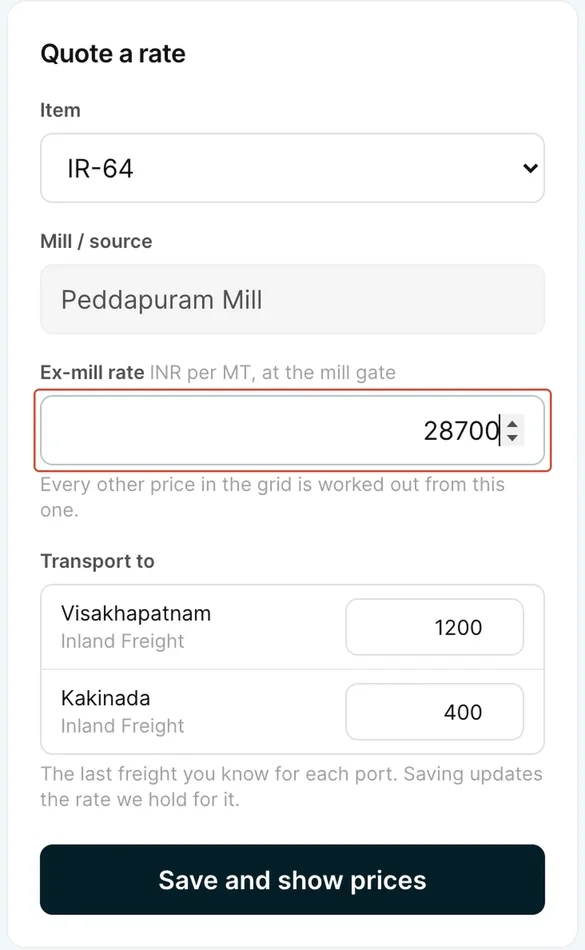
In Quote a rate, select your rice in Item. In the demo, it is IR-64.
-
Look at Mill / source. It shows your mill, for example Peddapuram Mill. If you have more than one mill, select the mill that you quote for.
-
Type your rate in Ex-mill rate. The label says the unit: INR per MT, at the mill gate. In the demo, the rate is 28700.
-
Look at Transport to. It shows your truck freight per MT from the mill to each port. In the demo, it is 1200 to Visakhapatnam and 400 to Kakinada. If the freight changed, type the new amount.
-
Tap Save and show prices. The Your prices box opens under the form.
Check it worked
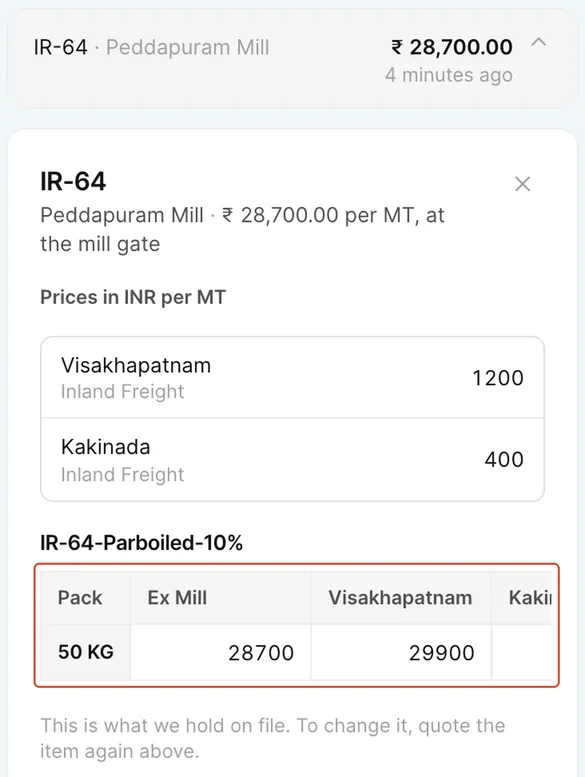
The Your prices box shows a table for each grade of your rice, for example IR-64-Parboiled-10%. There is one row for each pack, for example 50 KG. There is one column for Ex Mill and one column for each port. Each price is your rate plus the freight to that port. In the demo:
| Pack | Ex Mill | Visakhapatnam | Kakinada |
|---|---|---|---|
| 50 KG | 28700 | 29900 | 29100 |
Open the page again. Your rate is now at the top of the Already quoted list. Tap it to see the prices that Navchetan Agro Exports holds for it. On a phone, slide the table to the side to see Kakinada.
Good to know
- You give one rate each day. If you quote the same rice again on the same day, the portal changes today's rate. It does not add a second one. Tomorrow's quote is a new rate, and yesterday's rate stays in the list.
- The newest rate is the one that Navchetan Agro Exports uses for today's prices.
- When you save, the portal also saves the freight that you typed in Transport to as your freight to that port. Navchetan Agro Exports uses it, and it shows again in your next quote.
- On a phone, the table can be wider than the screen. Slide it to the side to see all the ports.
- In Already quoted, you can only read the prices. To change them, quote the item again in Quote a rate.